
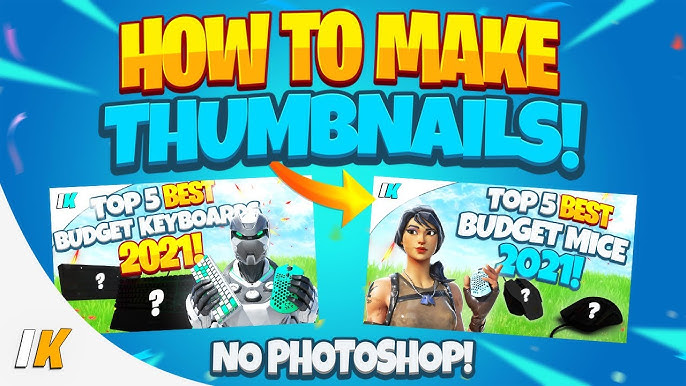
In the fast-paced world of gaming content creation, visuals matter more than ever. Among the many elements that can make or break your video
In the fast-paced world of gaming content creation, visuals matter more than ever. Among the many elements that can make or break your video’s performance, the Fortnite thumbnail plays a crucial role. It’s often the first thing viewers notice when scrolling through YouTube or social media platforms. A well-designed thumbnail can significantly increase clicks, engagement, and audience retention, while a poor one may cause your content to be ignored.
This article explores everything you need to know about creating an effective Fortnite thumbnail, including design principles, popular tools, tips for optimization, and trends in 2025. By the end, you’ll have a complete guide to making thumbnails that not only attract attention but also drive engagement for your Fortnite content.
1. Why Fortnite Thumbnails Matter
A thumbnail is more than just a picture; it’s your video’s first impression. Here’s why a Fortnite thumbnail is crucial:
A. Boosting Click-Through Rate (CTR)
YouTube and other platforms rely on thumbnails to determine which content to promote. Eye-catching thumbnails improve your CTR, increasing the likelihood that viewers will watch your video.
B. Conveying Video Content Quickly
A thumbnail instantly communicates your video’s topic. For Fortnite, this might include:
- Highlighting a new skin
- Showcasing a victory royale
- Featuring gameplay moments
C. Branding and Recognition
Consistent thumbnails with unique style, colors, or logos help build your personal brand. Regular viewers will recognize your Fortnite content instantly.
2. Key Elements of a Winning Fortnite Thumbnail

Creating a compelling Fortnite thumbnail requires attention to detail. Here are the main elements you should consider:
A. Bold and Vibrant Colors
Bright colors attract the eye, especially in a crowded platform like YouTube. Popular color schemes include:
- Neon blues and purples
- Contrasting yellows and oranges
- High-saturation reds for urgency
B. Dynamic Action Shots
Capture moments of intense action to create excitement. Examples:
- A build battle
- Eliminating an opponent
- Skydiving from the Battle Bus
C. Characters and Skins
Fans are drawn to recognizable Fortnite skins. Including popular characters makes your thumbnail relatable and increases engagement.
D. Text Overlays
Adding short, readable text improves context. Examples:
- “Victory Royale!”
- “Epic 1v1 Win”
- “Fortnite Update Highlights”
Make sure the text contrasts well with the background and is legible even on small screens.
E. Facial Expressions and Reactions
If your thumbnail features real players or streamers, exaggerating emotions like excitement, shock, or surprise increases curiosity and clicks.
3. Popular Tools for Creating Fortnite Thumbnails

Several tools make designing professional Fortnite thumbnails easier, even for beginners:
A. Canva
Canva offers pre-made gaming templates and intuitive drag-and-drop tools. Features include:
- Pre-sized templates for YouTube
- Text and sticker libraries
- Layering and effects
B. Photoshop
Adobe Photoshop is perfect for advanced creators. Benefits include:
- Custom effects and brushes
- High-quality cutouts of Fortnite characters
- Layer blending and color grading
C. GIMP
A free alternative to Photoshop, GIMP allows:
- Detailed editing
- Custom background creation
- Text and layering effects
D. Online Thumbnail Makers
Websites like Snappa, Fotor, and Picmaker offer:
- Quick templates
- AI-powered designs
- Easy exports in YouTube-ready sizes
E. AI Tools like humanizeai
Tools like humanizeai help:
- Generate thumbnail ideas
- Suggest text placement and design style
- Optimize thumbnails for CTR based on AI analysis
AI integration allows you to create thumbnails that are both eye-catching and data-driven.
4. Step-by-Step Guide to Making a Fortnite Thumbnail

Here’s a practical workflow for creating a high-performing Fortnite thumbnail:
Step 1: Choose a Background
Pick a vibrant Fortnite scene from your gameplay:
- Battle royale map
- Skydiving or gliding shots
- Epic fights or environmental landmarks
Step 2: Add Characters or Skins
Select popular Fortnite skins and cut them out from screenshots. Layer them prominently on the thumbnail.
Step 3: Apply Effects
Add effects like:
- Motion blur to indicate action
- Shadows for depth
- Glow effects around characters
Step 4: Include Text
Use short, engaging phrases. Keep the font bold and readable. Avoid overcrowding.
Step 5: Optimize Size
YouTube recommends:
- 1280 x 720 pixels
- 16:9 aspect ratio
- Under 2MB size
- High-resolution format (JPG or PNG)
Step 6: Test and Refine
Preview on different devices. Ensure text is legible on mobile screens, as most viewers watch on phones.
5. Trends in Fortnite Thumbnails for 2025
The gaming thumbnail landscape evolves quickly. Some emerging trends include:
A. AI-Enhanced Thumbnails
AI, including tools like humanizeai, is used to predict which thumbnail designs perform best. Features include:
- Color analysis
- Character placement suggestions
- CTR optimization
B. Minimalistic Designs
Instead of cluttered visuals, many creators now use:
- Single characters
- Clear backgrounds
- Subtle text overlays
C. Cinematic Composition
Thumbnails mimic cinematic scenes, using:
- Dramatic angles
- High contrast lighting
- Action-focused visuals
D. Interactive or Animated Thumbnails
Some platforms now allow GIF-like or animated thumbnails for extra engagement.
6. Common Mistakes to Avoid in Fortnite Thumbnails
Even experienced creators make errors. Avoid these pitfalls:
- Overcrowded visuals with too many elements
- Text that is too small to read on mobile
- Low-resolution images that appear pixelated
- Misleading thumbnails that don’t match content
- Ignoring trending skins or new game updates
Correcting these issues ensures better CTR and audience retention.
7. Optimizing Your Fortnite Thumbnail for YouTube
A. Keep It Relevant
Always match your thumbnail to your video content. Misleading thumbnails hurt engagement.
B. Use Branding Consistently
Add consistent colors, borders, or logos to make your content recognizable.
C. Focus on Emotions
Excitement, surprise, or humor draws viewers in. Make faces and reactions visible.
D. Test Multiple Versions
A/B testing different thumbnails can reveal what attracts your audience most.
E. Incorporate AI Insights
Use humanizeai to analyze which designs drive clicks. AI tools provide data-backed recommendations to refine your strategy.
8. Final Tips for Creating Epic Fortnite Thumbnails
- Keep it simple yet dynamic
- Highlight popular skins and characters
- Use bold, legible text
- Incorporate trending in-game moments
- Leverage AI tools for design insights
The combination of creativity, relevance, and optimization ensures your Fortnite thumbnail stands out in a crowded content space.
Conclusion
A well-designed Fortnite thumbnail is essential for attracting viewers, boosting engagement, and building your gaming brand. By understanding design principles, leveraging the right tools, and staying updated with trends, creators can make thumbnails that perform exceptionally well.
AI tools like humanizeai now play a critical role in thumbnail creation, helping creators combine creativity with data-driven insights. Whether you’re a beginner or a seasoned Fortnite content creator, mastering thumbnail design can dramatically improve your channel’s success.

COMMENTS