
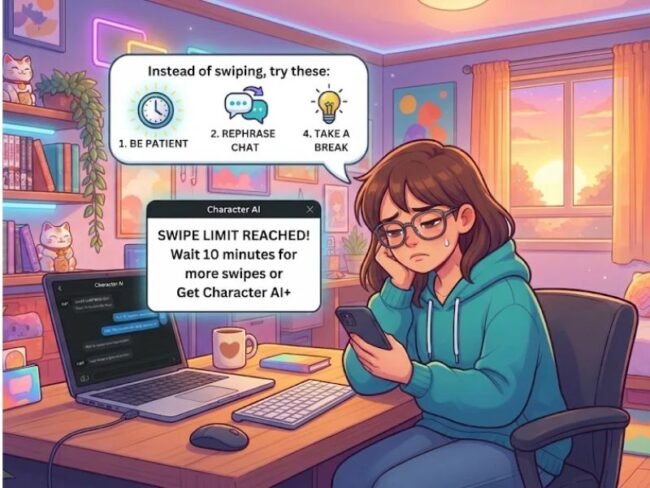
Character AI has become a popular platform for users who enjoy interactive conversations with AI-powered characters. Whether someone uses it for entertainment, storytelling, roleplaying, or casual discussions, the ability to generate different responses makes the experience more engaging. However, users may sometimes encounter the Character AI Swipe Limit, which can interrupt conversations and make it difficult to explore alternative responses.
This limitation can be frustrating, especially when users want to find a better answer or continue an interesting conversation. Understanding how the swipe feature works, why restrictions may appear, and what steps users can take can help create a smoother experience. In this article, we will explore practical ways to deal with swipe limitations and make conversations more enjoyable.
What Is the Character AI Swipe Limit?
The Character AI swipe feature allows users to browse alternative responses generated by an AI character. When a response does not match expectations, users can swipe to see another possible answer without restarting the entire conversation.
The Character AI Swipe Limit refers to a restriction users may encounter when attempting to generate or view additional alternative responses. Availability and restrictions may depend on platform behavior, account conditions, or technical issues.
This feature is useful because it gives users more control over conversations. Instead of accepting the first response, they can explore different answers and choose the one that best fits their preferred interaction.
Why Does Character AI Have a Swipe Limit?

Character AI Swipe Limit
There can be several reasons why users experience restrictions when generating alternative responses.
1. Platform Usage Restrictions
AI platforms manage significant computing resources to generate responses. Usage restrictions may help manage demand and maintain platform performance. However, Character AI does not necessarily publish a universal swipe quota that applies to every account.
2. Temporary Technical Issues
Sometimes, the swipe feature may stop working because of temporary server problems, connection interruptions, or application errors. In these situations, the issue may not be related to an actual account limit.
3. App or Browser Problems
An outdated application, corrupted cache, or browser compatibility issue can affect how certain features work. Users may mistakenly believe they have reached a swipe restriction when the problem is technical.
7 Ways to Deal With Character AI Swipe Limit During Conversations
If you are experiencing difficulties with alternative responses, the following methods may help.
1. Refresh Your Conversation
Refreshing the conversation can sometimes resolve temporary loading problems. If alternative responses are not appearing, reload the page or restart the application.
However, make sure your conversation is saved before refreshing to avoid losing recent messages.
2. Check Your Internet Connection
A weak or unstable internet connection can prevent Character AI from loading new responses correctly.
Try switching between Wi-Fi and mobile data. You can also restart your router or reconnect to your network to improve connectivity.
3. Restart the Character AI App
If you are using the mobile application, completely close it and open it again. Restarting the app can resolve temporary software issues and restore normal functionality.
You should also check whether an application update is available.
4. Clear Browser Cache and Cookies
For browser users, outdated cached information can sometimes interfere with website features.
Clearing your browser cache and cookies may help resolve loading problems. Remember that clearing cookies can sign you out of websites, so make sure you know your login details.
5. Try a Different Browser or Device
If the swipe feature does not work on your current browser, try accessing Character AI through another supported browser or device.
This can help determine whether the issue is connected to your browser settings, device, or account.
6. Give the Platform Some Time
If the problem is caused by temporary server issues or platform restrictions, repeatedly attempting to generate responses may not help.
Wait for some time and try again later. Checking official Character AI announcements or support information can also help identify ongoing service problems.
7. Contact Character AI Support
If the swipe feature continues to malfunction, consider contacting the platform’s support team.
Explain when the issue started, what happens when you use the swipe option, and which troubleshooting methods you have already attempted. Screenshots can also help explain the problem.
Tips to Make Character AI Conversations More Efficient
Managing conversations effectively can improve your overall experience, even when alternative response options are limited.
- Write Clear Prompts: Provide detailed instructions so the AI understands what type of response you expect.
- Add Context: Include relevant background information to help characters generate more suitable replies.
- Use Follow-Up Messages: Instead of repeatedly swiping, ask the character to explain, rewrite, or expand its previous response.
- Avoid Repeated Requests: Sending the same prompt multiple times may not produce meaningful improvements.
- Save Important Conversations: Keep useful responses and conversation details so you can refer to them later.
These simple practices can help users get better results without depending entirely on alternative response generation.
Does Character AI Plus Remove the Swipe Limit?
Character AI offers paid subscription features through its c.ai+ membership. However, users should not automatically assume that purchasing a subscription removes every possible swipe restriction.
Subscription benefits and platform limitations can change over time. Before upgrading, review the official membership information to understand exactly which features are included.
Users should also avoid unofficial tools or websites claiming to provide unlimited swipes, as these services may create account security and privacy risks.
Conclusion
The Character AI Swipe Limit can interrupt conversations when users want to explore alternative responses. However, understanding possible causes and using simple troubleshooting methods can help resolve many common problems.
Refreshing conversations, checking internet connectivity, updating the application, and contacting official support are useful steps when the feature stops working. Additionally, writing clearer prompts and using follow-up messages can make AI interactions more productive. With these practices, users can enjoy smoother conversations and get better results from Character AI.
Frequently Asked Questions (FAQs)
1. What is the Character AI Swipe Limit?
It refers to a restriction or problem that prevents users from generating or viewing additional alternative character responses under certain circumstances.
2. Why is my Character AI swipe feature not working?
Possible reasons include temporary server problems, internet connectivity issues, browser errors, outdated applications, or platform restrictions.
3. Can I fix Character AI swipe problems?
Yes. Refreshing the conversation, restarting the app, checking your internet connection, and clearing browser cache may help resolve technical problems.
4. Does Character AI Plus provide unlimited swipes?
Not necessarily. Users should check the current official subscription benefits rather than assuming that a paid membership removes all usage restrictions.
5. Can I continue conversations without swiping?
Yes. You can send follow-up messages, provide additional instructions, or ask the AI character to rewrite its previous response.
Related articles
Keep reading more from this topic.
Artex AI and the Future of AI-Powered Digital Creativity
Artificial intelligence is changing how people create, design, and interact with digital content. From…
How Sesame AI Voice Is Transforming AI-Powered Communication
Artificial intelligence is changing the way people communicate with technology. Traditional digital assistants often…
How JanitorAI Works and Why It Is Becoming Popular Among AI Users
Artificial intelligence is changing the way people interact with digital platforms. From virtual assistants…
COMMENTS