
Email security has become a top priority for businesses, website owners, and IT professionals as cyber threats continue to evolve. A Free DMARC Check
Email security has become a top priority for businesses, website owners, and IT professionals as cyber threats continue to evolve. A Free DMARC Check Tool: A Complete Guide for Website Owners helps organizations verify whether their email authentication is correctly configured, reducing the risk of phishing, spoofing, and email fraud. A properly configured DMARC record works alongside SPF and DKIM to protect your domain from unauthorized use while improving email deliverability. Whether you’re looking for a reliable DNS record checker, effective email spoofing prevention, or powerful cybersecurity tools, understanding how a free DMARC check tool works is essential for securing your online communications.
Free DMARC Check Tool: A Complete Guide for Website Owners
A Free DMARC Check Tool: A Complete Guide for Website Owners explains how website administrators can analyze their DMARC configuration and identify potential security issues before attackers exploit them.
DMARC (Domain-based Message Authentication, Reporting, and Conformance) helps email providers determine whether incoming emails claiming to come from your domain are legitimate. Without a valid DMARC policy, attackers can impersonate your domain to send phishing emails or scams.
Using a free DMARC checker is one of the easiest ways to verify that your email authentication records are correctly configured.
What Is DMARC?
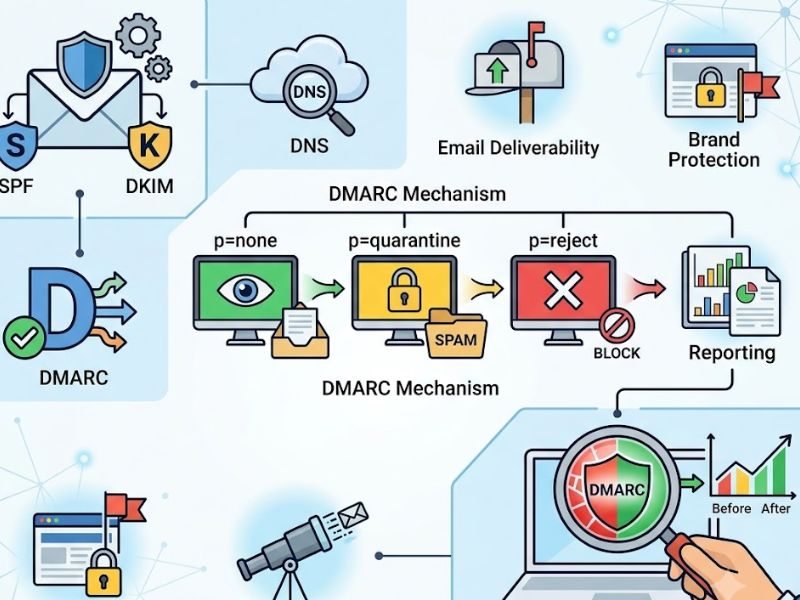
DMARC is an email authentication protocol designed to protect domains from unauthorized email use.
It works together with:
- SPF (Sender Policy Framework)
- DKIM (DomainKeys Identified Mail)
These technologies verify whether outgoing emails originate from authorized servers and have not been modified during transmission.
Why Website Owners Need a DMARC Check Tool
Website owners often focus on website security while overlooking email security.
A DMARC check tool helps:
- Verify DNS records
- Detect configuration errors
- Improve email deliverability
- Reduce phishing risks
- Protect brand reputation
- Prevent domain abuse
Proper email authentication increases trust with both customers and email providers.
How a Free DMARC Check Tool Works
A Free DMARC Check Tool scans your domain’s DNS records and validates whether your DMARC policy is correctly configured.
The tool typically checks:
- DMARC record availability
- SPF configuration
- DKIM alignment
- Policy settings
- Reporting addresses
- Syntax errors
- DNS propagation status
The generated report highlights problems and offers recommendations for improvement.
DNS Record Checker
A reliable DNS record checker plays an important role in email authentication.
It helps verify records such as:
- DMARC
- SPF
- DKIM
- MX records
- TXT records
- CNAME records
Incorrect DNS records can prevent legitimate emails from reaching recipients or weaken domain security.
Benefits of DMARC
Implementing DMARC offers several important benefits.
Better Email Security
DMARC helps prevent attackers from sending fraudulent emails using your domain.
Improved Email Deliverability
Authenticated emails are more likely to reach inboxes instead of spam folders.
Stronger Brand Protection
Customers are less likely to receive fake emails pretending to represent your business.
Greater Visibility
DMARC reports provide insights into who is sending email using your domain.
Email Spoofing Prevention
One of the biggest reasons organizations implement DMARC is email spoofing prevention.
Email spoofing occurs when attackers forge your domain name to deceive recipients.
DMARC reduces this risk by:
- Verifying sender identity
- Rejecting unauthorized messages
- Quarantining suspicious emails
- Monitoring authentication failures
- Generating detailed reports
These measures help protect both businesses and customers.
Understanding SPF and DKIM

Free DMARC Check Tool
DMARC relies on two important authentication methods.
SPF
SPF identifies which mail servers are authorized to send emails for your domain.
DKIM
DKIM digitally signs outgoing emails to verify that the message has not been altered during delivery.
Together with DMARC, these technologies create a strong email security framework.
Common DMARC Errors
Many domains experience authentication issues due to configuration mistakes.
Common problems include:
- Missing DMARC records
- Incorrect SPF syntax
- DKIM failures
- Invalid reporting addresses
- DNS propagation delays
- Policy misconfiguration
Regular monitoring helps identify and resolve these issues quickly.
Cybersecurity Tools for Email Protection
Modern cybersecurity tools help organizations strengthen email security beyond DMARC.
Examples include:
- Email security gateways
- Anti-phishing software
- DNS monitoring tools
- Threat detection platforms
- Endpoint protection
- Security information and event management (SIEM)
Combining multiple security solutions creates stronger protection against evolving threats.
Best Practices for DMARC
Website owners should follow several best practices.
These include:
- Publish valid SPF records
- Enable DKIM signing
- Create a DMARC policy
- Monitor DMARC reports regularly
- Update DNS records when mail providers change
- Test configurations after updates
- Review authentication failures
Consistent monitoring ensures long-term email security.
Why DMARC Improves Email Deliverability
Email providers increasingly rely on authentication when deciding whether to trust incoming messages.
Proper DMARC implementation helps:
- Reduce spam classification
- Improve inbox placement
- Increase recipient trust
- Lower bounce rates
- Support secure business communication
Organizations with strong authentication policies often experience better email performance.
Future of Email Authentication
Email security continues evolving alongside cyber threats.
Future improvements may include:
- AI-powered threat detection
- Smarter phishing prevention
- Automated authentication monitoring
- Improved reporting dashboards
- Enhanced domain reputation analysis
- Better integration with cloud email services
Website owners who stay updated with modern authentication standards will be better prepared for emerging threats.
Conclusion
A Free DMARC Check Tool: A Complete Guide for Website Owners is an essential resource for anyone responsible for managing a website or business domain. By using a trusted DNS record checker, implementing effective email spoofing prevention measures, and combining DMARC with modern cybersecurity tools, organizations can significantly improve email security and protect their brand reputation. Regular monitoring, proper DNS configuration, and ongoing security reviews help ensure that legitimate emails reach recipients while blocking unauthorized senders.
Frequently Asked Questions (FAQs)
What is a Free DMARC Check Tool?
A Free DMARC Check Tool analyzes your domain’s DMARC configuration, verifies DNS records, and identifies authentication issues that may affect email security.
Why do I need a DNS record checker?
A DNS record checker helps verify important records such as DMARC, SPF, DKIM, MX, and TXT, ensuring that your email authentication is correctly configured.
How does DMARC help with email spoofing prevention?
DMARC supports email spoofing prevention by verifying whether incoming emails are authorized to use your domain and allowing unauthorized messages to be quarantined or rejected.
What cybersecurity tools work with DMARC?
Many cybersecurity tools complement DMARC, including email security gateways, anti-phishing platforms, DNS monitoring solutions, endpoint protection, and threat detection systems.
Can small businesses benefit from DMARC?
Yes. Businesses of all sizes can benefit from DMARC by improving email deliverability, protecting customer trust, preventing phishing attacks, and strengthening overall email security.

COMMENTS