
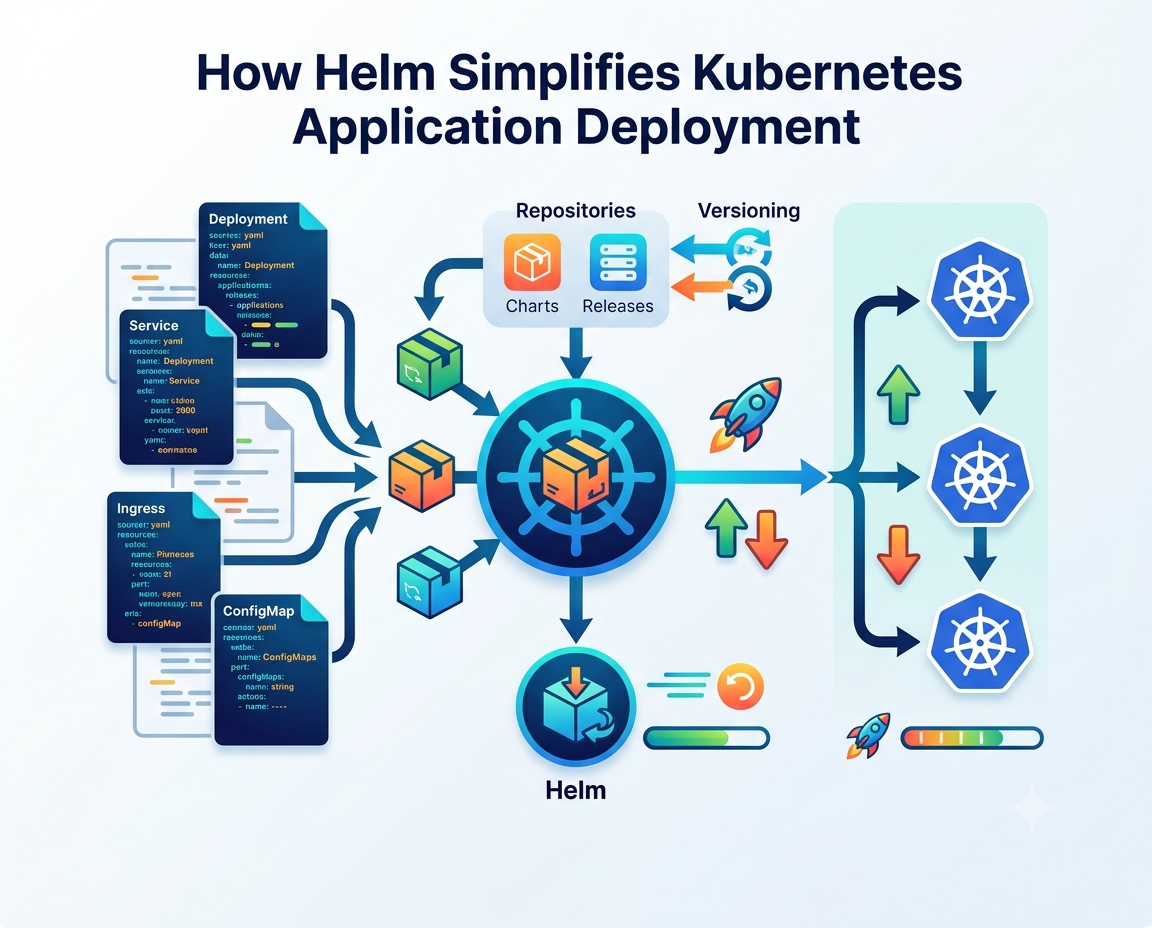
Introduction Managing applications in Kubernetes can become challenging as projects grow in size and complexity. Developers and DevOps teams often ne
Introduction
Managing applications in Kubernetes can become challenging as projects grow in size and complexity. Developers and DevOps teams often need to deploy multiple resources, manage configuration files, and ensure consistency across different environments. This is where Helm becomes an invaluable tool. Often referred to as the package manager for Kubernetes, Helm simplifies application deployment by using reusable templates called Helm charts. It enables teams to deploy, update, and manage Kubernetes applications efficiently while reducing manual effort and configuration errors.
What Is Helm?
Helm is an open-source package manager designed specifically for Kubernetes. Instead of manually creating and applying multiple YAML configuration files, Helm packages all the required Kubernetes resources into a single, reusable chart.
A Helm package typically includes:
- Deployment configurations
- Services
- ConfigMaps
- Secrets
- Ingress resources
- Persistent volume definitions
By organizing these resources into one package, Helm makes application deployment faster and easier.
Why Kubernetes Deployments Can Be Complex
Kubernetes provides powerful orchestration capabilities, but managing multiple configuration files can quickly become overwhelming.
Common deployment challenges include:
- Large numbers of YAML files
- Environment-specific configurations
- Version management
- Resource dependencies
- Application upgrades
- Rollback procedures
Without a structured deployment tool, maintaining consistency across environments becomes difficult.
Understanding Helm Charts
The foundation of Helm is the Helm chart.
A Helm chart is a collection of files that define all the Kubernetes resources needed to deploy an application.
A typical chart contains:
- Chart metadata
- Configuration values
- Kubernetes templates
- Dependency information
- Documentation
Because charts are reusable, teams can deploy identical applications across development, testing, and production environments with minimal changes.
Benefits of Using Helm
Helm offers several advantages for Kubernetes administrators and developers.
Faster Deployments
Applications can be deployed using a single command instead of applying multiple configuration files manually.
Reusable Templates
Helm charts eliminate repetitive configuration work by allowing reusable deployment templates.
Easy Configuration Management
Different environments can use different configuration values without modifying the underlying templates.
Version Control
Helm tracks application versions, making upgrades and rollbacks straightforward.
Simplified Maintenance
Managing updates becomes easier because all application resources are organized within a single package. These features significantly improve deployment efficiency.
How Helm Simplifies Kubernetes Deployment
A typical Kubernetes deployment with Helm follows a simple workflow.
Step 1: Create or Download a Helm Chart
Developers can create custom charts or use community-maintained charts from trusted repositories.
Step 2: Configure Values
Application-specific settings are stored in a values file, allowing different configurations for different environments.
Step 3: Install the Application
A single Helm command deploys all required Kubernetes resources.
Step 4: Manage Updates
Helm applies only the necessary changes during upgrades while preserving application state whenever possible.
Step 5: Roll Back if Needed
If a deployment fails, Helm can quickly restore a previous working version. This streamlined workflow reduces operational complexity.
Helm in DevOps and CI/CD

Helm
Helm plays an important role in modern DevOps practices.
It integrates well with Continuous Integration and Continuous Deployment (CI/CD) pipelines by automating Kubernetes deployments.
Benefits include:
- Consistent deployments
- Automated releases
- Faster delivery cycles
- Reduced manual intervention
- Improved deployment reliability
These capabilities help development teams deliver software more efficiently.
Managing Multiple Environments
Many organizations maintain separate Kubernetes clusters for development, staging, and production. Helm simplifies this process by allowing different configuration files for each environment while using the same application templates.
Environment-specific settings may include:
- Resource limits
- Database connections
- API endpoints
- Replica counts
- Security configurations
This flexibility minimizes duplication while maintaining consistency.
Best Practices for Using Helm
To maximize the benefits of Helm, organizations should follow several best practices.
Use Version Control
Store Helm charts in source control repositories.
Keep Charts Modular
Smaller, reusable charts are easier to maintain.
Validate Templates
Test charts before deploying them to production environments.
Secure Sensitive Data
Avoid storing passwords directly inside charts. Instead, use Kubernetes Secrets or external secret management tools.
Document Configurations
Clear documentation simplifies maintenance and onboarding for new team members. Following these practices helps ensure reliable deployments.
Common Use Cases for Helm
Helm is widely used across cloud-native environments.
Popular use cases include:
- Deploying web applications
- Managing microservices
- Installing monitoring tools
- Deploying databases
- Setting up logging platforms
- Managing cloud-native infrastructure
Its flexibility makes Helm suitable for organizations of all sizes.
Challenges and Considerations
Although Helm simplifies Kubernetes management, there are still some considerations.
Organizations should be aware of:
- Learning Helm template syntax
- Managing chart dependencies
- Keeping charts updated
- Securing configuration values
- Maintaining compatibility with Kubernetes versions
With proper planning, these challenges are generally easy to manage.
The Future of Helm
As Kubernetes adoption continues to grow, Helm remains one of the most widely used deployment tools in cloud-native environments.
Future developments are expected to include:
- Better security features
- Improved automation
- Enhanced chart repositories
- Stronger GitOps integration
- Simplified deployment workflows
These improvements will continue making Kubernetes deployments more efficient and reliable.
Conclusion
Helm has transformed how teams manage Kubernetes deployment by simplifying application packaging, configuration management, and release processes. Through reusable Helm charts, organizations can deploy applications consistently, reduce manual configuration, and improve operational efficiency.
As Kubernetes becomes the standard platform for container orchestration, Helm remains an essential tool for developers, DevOps engineers, and platform administrators. By adopting Helm and following best practices, organizations can streamline deployments, improve reliability, and accelerate software delivery.
FAQs
1. What is Helm in Kubernetes?
Helm is an open-source package manager that simplifies Kubernetes application deployment using reusable Helm charts.
2. What are Helm charts?
Helm charts are packages containing Kubernetes resource definitions, templates, configuration values, and metadata required to deploy an application.
3. Why is Helm useful for Kubernetes deployment?
Helm automates deployments, manages application versions, simplifies configuration, and supports easy upgrades and rollbacks.
4. Can Helm be used with CI/CD pipelines?
Yes. Helm integrates with CI/CD tools to automate Kubernetes deployments and improve software delivery workflows.
5. Is Helm suitable for production environments?
Yes. Helm is widely used in production to manage complex Kubernetes applications efficiently while supporting version control and rollback capabilities.

COMMENTS