
Artificial intelligence is becoming an important part of how businesses operate, communicate, and complete everyday tasks. From automating repetitive work to helping employees analyze information, AI is changing the way organizations approach productivity and innovation. AI Adoption at Work refers to the process of introducing artificial intelligence tools and technologies into workplace operations to support employees, improve workflows, and achieve business goals. As companies explore AI-powered solutions, understanding how to implement them responsibly and effectively has become essential. This article explains the benefits of AI adoption, common applications, implementation strategies, challenges, and the future of artificial intelligence in the workplace.
What Is AI Adoption at Work?
AI adoption at work is when a company brings artificial intelligence into daily work. This can touch business routines, how staff complete tasks, and how choices are made inside the company. Teams may use AI software in many places. For example, it can support customer service, sort and study data, help with content, assist with project tracking, aid hiring, or handle routine admin work. Some firms start with small tools. These may be writing helpers. Other firms move faster and use bigger systems. Those can review huge data sets and run harder processes on their own.
The point is not always to remove people from the job. Often, the aim is to let staff finish work faster. It also gives them more time for parts that need ideas, back-and-forth with others, and real judgment. For this to work, the company has to pick tools that fit the job. It also needs to teach employees what the tools do and how to use them.
Benefits of AI Adoption at Work
A big upside of bringing AI into daily work is that it can make teams faster. It can take over the dull parts, like sorting data, drafting standard updates, pulling key points from long files, and answering the most routine questions from customers. When that happens, people can focus on tasks that need judgment, careful thinking, and real problem solving.
AI can also move through large amounts of material quickly and point out links that are hard to spot by hand. Still, better speed is not automatic. It depends on the tools being solid, on whether they match the way work already runs, and on whether staff get clear training. The goal is simple: help workers do what matters, without adding extra mess.
How AI Adoption at Work Improves Productivity
AI-powered workplace tools can help staff with daily tasks. For instance, a marketing group might use AI to come up with topic ideas, scan campaign results, and draft first versions of copy. In customer support, AI can pull key points from chats and suggest answers for common questions. In finance, artificial intelligence can sort records and flag odd payments so someone can check them.
These uses cut down on repeat work and can speed up how fast people finish their parts. Still, a person should review what AI produces. Sometimes it gets things wrong, or it misses details that matter when leaders make decisions.
AI Adoption at Work and Employee Collaboration
AI can also help people work together across teams. For example, meeting helpers can recap what was said. They can also point out next steps that need owners. Some tools can even help staff set up the follow-up work. Translation features can help when teams use different languages. That way, messages are easier to share and understand.
In project tools, AI may sort tasks by priority. It can also flag work that looks like it may fall behind. It may help keep project details in order too. When these things are in place, teams can see more of what is happening in other groups. Staff may also waste less time looking for notes and files. Still, companies should double-check any AI recap or advice. Staff should confirm the facts before using it for key choices.
Common Challenges of AI Adoption at Work
AI rollouts can help companies, but they can also bring problems. Many staff worry that their jobs may shift or disappear. Others raise questions about how data is used and how private it stays. People also doubt that AI answers are always correct. On top of that, learning a new tool takes time, and workers still have to meet their current duties.
Costs are another issue. Organizations often pay for software access, training sessions, setup and system links, and security work. There is also the risk that an AI tool may favor one group or give wrong outputs. That can harm decisions and trust. To reduce these issues, leaders need to be clear with workers, set solid rules, and ask employees for input. If a company takes time to plan the rollout well, it can spot trouble sooner. It can also make day-to-day use of AI at work feel smoother.
How Businesses Can Implement AI Successfully
AI Adoption at Work
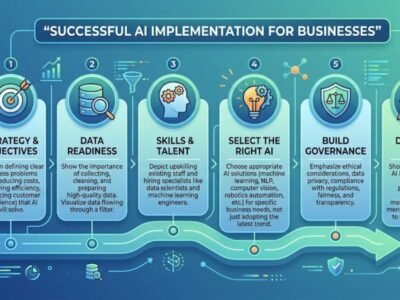
Successful AI Adoption at work starts by naming the business issues where AI could help. Do not roll out AI just because it is available. Look for work that is dull, slow, or easy to automate. Try one small pilot first. This lets the team test the system and check the outcomes before any larger rollout. Train staff so they know how to work with these tools. Also teach them to check facts and flag mistakes. Set rules for privacy and data safety so confidential information stays protected. Put clear guidance in writing for what AI may and may not do. Require a human to review outputs. Make sure someone accountable makes the final call on decisions.
AI Adoption at Work and Employee Skills
AI is reshaping what workers must know in many fields. In the next few years, people will likely need help learning how to use AI tools, check AI-made content for accuracy, and craft clear prompts. It will also matter to understand the basics of data safety. Even with these changes, some skills do not go away. Staff still need good judgment. They need to think through problems, stay creative, and communicate well. In day-to-day work, employees will still have to decide when and where AI fits.
Businesses can make this easier with training. Short workshops can help. Teams can also get time to try the tools in real tasks. When workers build both practical tech skills and everyday human skills, they can handle new processes and use these systems in a useful way.
Data Security and Responsible AI Use
Data security: When you bring AI to work, think about it carefully. Staff may see private customer details, money records, company plans, or personal data. That kind of data should not go to systems that are not allowed to receive it. Set clear rules for the workplace. Tell people what data is OK to put into AI tools. Also say what must stay off those tools. Then check the AI vendor first. Look at how they handle security and privacy. Do not skip this step.
Carefully use AI. Review what the tool produces. Watch for wrong or risky answers. Guard sensitive material at every stage. And for decisions that really matter, have trained staff review the results. This can lower the chance of harm and help employees and customers feel safer.
Measuring the Success of AI Adoption
Companies should check how well AI performs after they roll it out. The goal is to see if the system truly adds value. Look at things like how much time people save on repeated work, whether customer replies get faster, and if mistakes go down. You can also track how staff feel about the change and how good the finished output is.
For instance, if a firm adds an AI assistant for customer support, it can compare reply speed and customer comments from before the launch to after. When you review these results, you can spot which tools help and which steps still need work. It also helps to pay attention to employee day to day experience and the overall service quality. Do not focus only on the number of tasks that got automated.
The Future of AI Adoption at Work
AI will likely move further into daily work tools. It may show up inside common office software in a more natural way. People could use it to sort notes, handle repeat work, and line up steps across apps. Companies may also lean on it for planning and prediction. It can aid customer support and help teams think through how operations will run. As these tools improve, firms will still need guardrails. They must keep data private and make room for human checks.
Workers will also need time to learn new ways of doing tasks. The best workplace AI will be the kind that tackles problems staff already face. It should match how teams work now and support people in getting things done.
Conclusion
Workplace use of AI is reshaping how companies handle tasks, help staff, and increase output. AI tools can take on repeat jobs, support day-to-day messages, and sift through data faster than people. That said, buying a tool is not the whole story. First, a firm should set clear aims it actually wants to reach. Next, staff need hands-on training so the tools make sense in their roles. At the same time, companies must keep private data safe and limit what AI can access. After that, the results should be checked. Metrics and feedback can show what is working and what needs changes.
Related articles
Keep reading more from this topic.

Pure Xbox: Latest Xbox News, Reviews, Games, and Updates
Introduction Pure Xbox is a gaming website dedicated to Xbox fans who want to…

How AI Wealth Concentration is Changing the Future of Business
The impact of artificial intelligence on business operations, competition, and profit generation is changing…
Is Manus AI Good for Small Businesses in 2026
Small businesses often need to manage marketing, customer communication, research, reporting, and daily operations…
COMMENTS