Making a slide deck the right way can take a long time. You still have to plan the flow, write the text, pick a style, place pictures, and set up each slide yourself. It is easy for the work to drag on. A tool for making PowerPoint slides with AI can cut down that effort. It uses machine learning to take an idea or notes, then builds a deck with a clear order. It can work from text, files, or short prompts.
These tools can be handy for students and teachers. They can also help people in marketing, business, and content creation. Instead of staring at an empty file, you can share a topic. Then the tool helps draft the first outline, add the main points, and suggest a layout. With AI getting better over time, these slide makers are starting to save more time. They also help create decks that feel more interesting for work and school.
What Is an AI PowerPoint Generator?
An AI PowerPoint Generator is a software tool that uses artificial intelligence to create presentation slides based on information provided by the user. Depending on the platform, users may enter a simple prompt, upload a document, provide an outline, or describe the type of presentation they need. The AI can then generate a slide structure, suggest headings, summarize information, and organize content across multiple slides. Some tools can also recommend layouts, images, icons, charts, and other visual elements. This makes the presentation creation process more automated and allows users to focus more on reviewing and improving the final content.
How an AI PowerPoint Generator Works
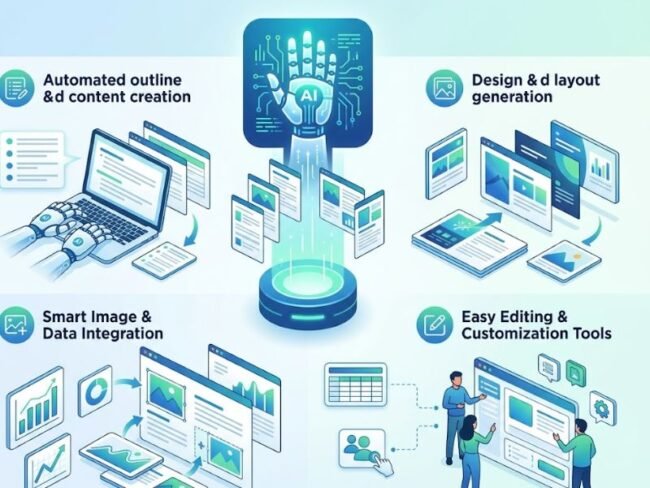
Many AI tools for slides work in a plain way. You start by sharing a topic, or a prompt, or a file. Sometimes it is just a short list of directions. The system reads what you sent and pulls out the key points. After that, it puts the material into a basic plan. Then it turns that plan into slide by slide content.
Depending on the tool, it may also draft slide headings and small lists. Some tools add speaker notes. Others choose pictures and layout styles on their own. Once the first version is made, you can tweak it. You can swap the wording, replace images, change color choices, and adjust fonts. You can also move the order of slides if you need a different flow.
Benefits of Using an AI PowerPoint Generator
A big plus of an AI tool for PowerPoint is how fast it helps. If you make slides by hand, you usually spend hours on research, writing, and formatting. You also have to handle layout and design, which adds more work when the project is long. With AI, some of that early effort can be done for you. You can get a simple slide outline in a short time.
These tools can also help when you are not great at graphic design. They can place items into neat layouts and sort the content so each slide looks steadier. Even so, you should read everything before you share it. Make sure the facts are right and the tone fits the people who will view the slides.
AI PowerPoint Generator for Business Presentations
Many people in business make slides for different needs. They prepare decks for meetings and sales talks. They also build reports, training materials, and client proposals. A tool can turn notes into a slide layout. An AI PowerPoint Generator is one option. In this case, a person might share a company report. Then the tool can draft a presentation that points to major results. It can also cover market trends, problems, and next steps.
Such tools can shorten long text. They can group ideas into clear sections. After that, the team can edit the deck. They can add brand colors, place logos on the slides, and use charts. They can also swap in the specific figures their team needs. This can cut down on repetitive formatting tasks. It also gives staff more time to craft the message they actually want to share.
AI PowerPoint Generator for Students and Teachers
Education is another area where AI presentation tools can be useful. Students can use them to create presentations for research projects, classroom assignments, and group discussions. Teachers can use AI to prepare lesson slides, explain complex topics, or develop educational materials. For example, a teacher could provide a lesson topic and ask an AI tool to create a presentation containing an introduction, key concepts, examples, and a conclusion. Students should still verify information generated by AI and follow their school’s academic policies regarding AI-assisted work. Used responsibly, these tools can provide a useful starting point for organizing educational content.
Creating More Engaging Presentations with AI

AI PowerPoint Generator
A presentation works best when people can follow the ideas fast. Clear visuals and simple layout choices help a lot. An AI PowerPoint generator can guide the structure. It may suggest slide layouts and point to images, diagrams, and charts that fit the topic. Some tools can spot key points. Then they recommend ways to show those points without dumping long text into one place.
You can also share details with the tool. For example, you can set the style you want, who the audience is, how long the talk should be, and the tone. After the slides are made, go through each one. Cut anything that does not help. AI can build the outline, but a person should edit the final version. That is what keeps the slides sounding like a real message instead of a template.
Important Features to Look For
Picking an AI tool for slides is not a one size fit all choice. Many people start by checking whether it can turn a text prompt into a slide draft. That feature saves time when you need a deck fast. Next, see if the tool lets you bring in files or documents. If you already have a report or meeting notes, import can help you reuse what you wrote. You also need control over the output. AI text and media may not match your exact needs, so editing matters. Look for simple ways to change layout, wording, or images.
Some add ons can be helpful too. Templates can speed things up. Layout tools can keep things neat. Image creation can add visuals without extra steps. Chart support helps when you have numbers to show. Don’t forget the smaller items. Speaker notes can keep your talk on track. Team work and sharing can matter if others will review slides. Export options are useful when you need to send files to others.
Limitations of AI Presentation Generators
AI presentation tools can cut down on work, but they still have limits. Content made by AI can be wrong on facts. It may also repeat the same kind of wording. Sometimes the details are so broad that they do not fit the right group of people. Even when the layout looks fine, it may need changes. Branding rules often do not match what the tool picks on its own. Student projects can also require a specific style, so editing is usually needed. Free plans can be tight. Some tools cap how many slides or talks you can make. Others limit template choices, exports, or access to certain AI options.
There is also the privacy issue. Uploading confidential company files or personal data can be risky. Before you share private material, check how the site stores and uses it. Also, do not skip human review. AI can help you build slides faster, but it should not take the place of checking sources and refining the final copy.
Tips for Getting Better Results from AI Presentation Tools
Making a slide deck with AI usually comes down to what the user tells it. If you only write a broad request, the result can feel generic. Try to add clear details instead. Mention the subject. who will watch it, how many slides you want, and what style to use. Also state what should be inside the deck. For instance, tell the AI if this is meant for a board meeting, a class task, a product pitch, or a training talk. When the draft is ready, review it. Look for mistakes in the facts. Edit the wording so it reads better. Swap out images that do not fit. Cut slides that add little value.
The Future of AI-Powered Presentations
AI will probably matter more in how people build slides. In the next wave of tools, you may see better theme control, edits that multiple people can do at the same time, charts made from data without much effort, and voice output that sounds more natural. Some systems may also add buttons and other ways for the viewer to interact. Another upside is that a deck can refresh itself when the source figures get updated.
As these tools improve, time spent on manual layout may drop. More effort may go to getting the message across, shaping the story, and helping with decisions. Still, people will need to bring taste and judgment. A talk should have a clear aim, and it must fit who will watch it.
Conclusion
An AI tool for PowerPoint can speed up how slides get made. It helps people draft slide outlines, write key points, pick layouts, and suggest images. This can help in many roles, such as office teams, students, teachers, marketers, and other people who make slides often.
Even so, the user should read the finished deck before it is shared. Check that facts are correct. Make sure the message is clear. Look for original work. Also confirm the design looks solid. With AI doing some of the heavy lifting, and with a person editing at the end, slide decks can be put together faster and still look professional.
Related articles
Keep reading more from this topic.

How Razer Ava Could Transform the Future of AI Gaming
AI is revolutionizing the way players engage in video games by providing intelligent non-player…

Is CharaxAI Worth Exploring in 2026
As artificial intelligence continues to reshape our interactions with digital entertainment, virtual characters, and…

Is Google Fitbit Edge Worth Buying in 2026
Choosing the right fitness tracker can make it easier to monitor daily activity, improve…
COMMENTS