
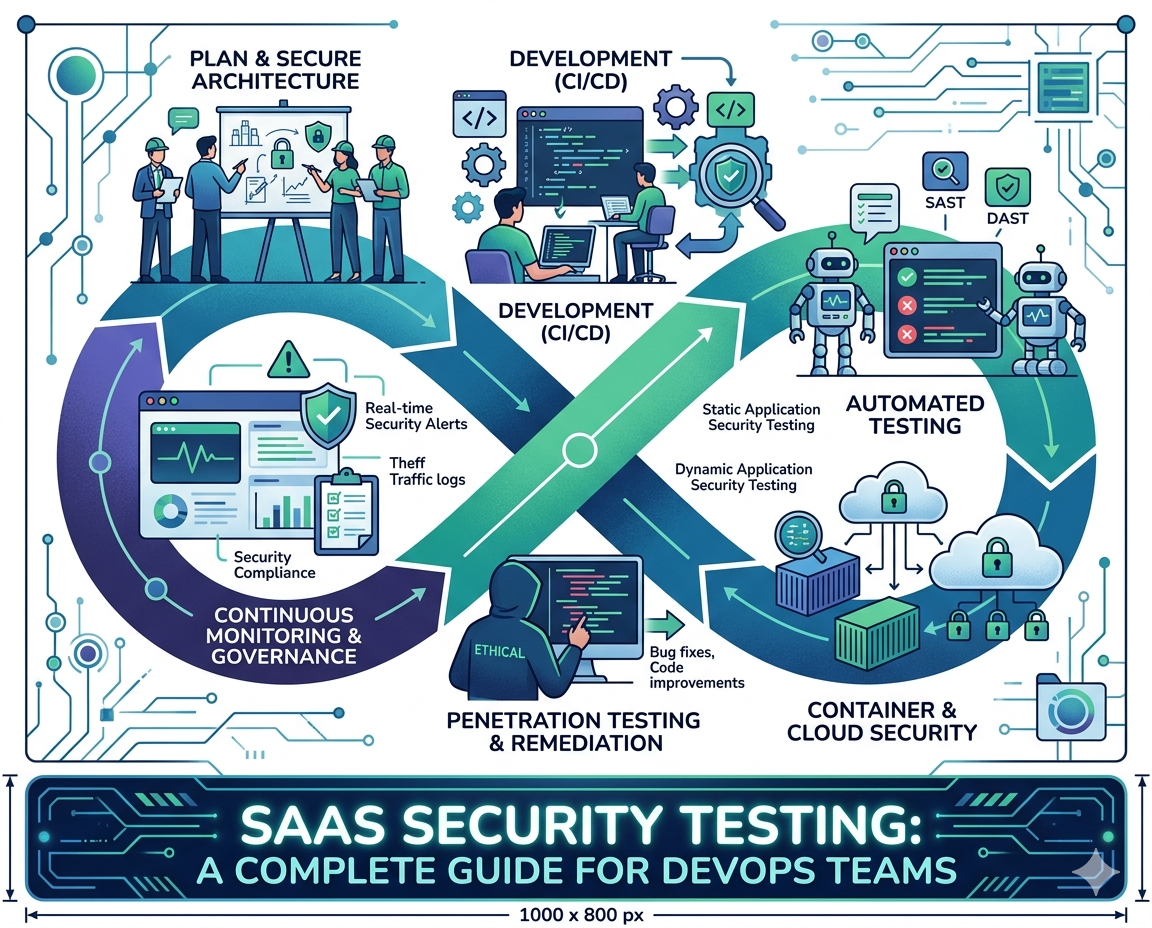
Introduction DevOps teams today are under tremendous pressure. They must ship features fast, keep uptime high, and ensure customer data stays safe. T
Introduction
DevOps teams today are under tremendous pressure. They must ship features fast, keep uptime high, and ensure customer data stays safe. The last part—security often becomes the bottleneck. That is where saas security testing enters the picture. For any company building or running a SaaS product, security cannot be an afterthought. It must be baked into the development pipeline from day one.
This guide is written specifically for DevOps engineers who want to implement saas security testing without slowing down their continuous delivery cycles. Whether you are protecting customer payment data, healthcare records, or simply user login credentials, a robust security testing strategy is no longer optional. It is a business requirement. Let us walk through everything you need to know about modern saas security testing for DevOps teams.
What is SaaS Security Testing and Why Does It Matter?
Before diving into tools and techniques, let us define the term. Saas security testing refers to the process of identifying vulnerabilities, misconfigurations, and weaknesses in a cloud-based software application.
Unlike traditional software that runs on a customer’s own servers, SaaS applications are hosted by the vendor and accessed via the internet. This means the attack surface is much larger. A single vulnerability in your SaaS product could expose thousands or even millions of customer records. For DevOps teams, saas security testing is critical because it helps catch issues before hackers do.
Common threats include broken authentication, insecure APIs, SQL injection, cross-site scripting, and misconfigured cloud storage buckets. When you integrate saas security testing into your CI/CD pipeline, you shift security left. That means finding and fixing problems early, when they are cheap and easy to resolve. The alternative—discovering a breach after going live can cost millions in fines, legal fees, and lost customer trust.
Types of SaaS Security Testing Every DevOps Team Needs
A complete saas security testing strategy includes multiple layers. No single tool can catch everything. Here are the essential types that every DevOps team should implement.
Static Application Security Testing, or SAST, is the first layer. SAST tools scan your source code before it is even compiled. They look for patterns known to cause vulnerabilities, such as unsafe functions or hardcoded secrets. SAST is fast and can run on every pull request. The second layer is Dynamic Application Security Testing, or DAST. Unlike SAST, DAST tests the running application from the outside, just like a real attacker would. It sends malicious payloads to your APIs and web interfaces to see if they break. DAST is excellent for finding runtime issues that SAST might miss. The third layer is Software Composition Analysis, or SCA.
Modern SaaS applications use hundreds of open-source libraries. SCA scans these dependencies for known vulnerabilities. When you practice comprehensive saas security testing, you run SAST, DAST, and SCA together. The fourth layer is container scanning. Most SaaS apps today run inside Docker containers. Container scanning looks for vulnerabilities in base images and installed packages. Finally, penetration testing is the human layer. While automated saas security testing catches low-hanging fruit, ethical hackers find logical flaws that machines cannot detect. A combined approach is the gold standard.
How to Integrate SaaS Security Testing into Your CI/CD Pipeline
Knowing what to test is one thing. Actually, integrating saas security testing into your DevOps workflow is another challenge entirely. The goal is to make security invisible to developers while catching issues automatically. Start by adding SAST to your pull request workflow. Every time a developer opens a PR, your SAST tool runs against the changed code. If critical issues are found, the PR fails, and the developer fixes them before merging. Next, add SCA scanning to the same pipeline.
This checks for vulnerable dependencies. For DAST, run it against a staging environment after every successful deployment. DAST takes longer, so it should not block every commit. Instead, run it nightly or on demand. Container scanning happens right before you push an image to your registry. Many DevOps teams using saas security testing in this way find that most vulnerabilities are caught within minutes of being introduced. Finally, schedule automated saas security testing scans on your production environment weekly. This catches configuration drifts and new vulnerabilities that emerge in dependencies. The key is automation. When saas security testing is fully automated, developers never have to think about running tests manually. The pipeline just enforces security.
Best Tools for SaaS Security Testing in 2025
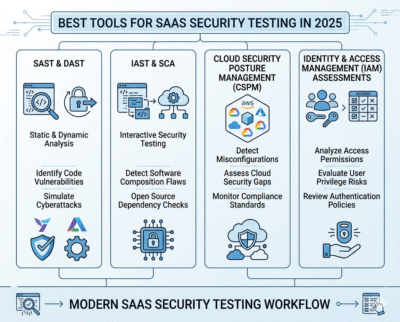
Choosing the right tools for saas security testing depends on your stack and budget. For SAST, popular options include Snyk Code, Checkmarx, and Semgrep. Snyk is especially friendly for DevOps teams because it integrates natively with GitHub and GitLab. For DAST, OWASP ZAP is free and powerful, while Invicti and Burp Suite Professional offer enterprise features.
For SCA, Snyk and Mend (formerly WhiteSource) are industry leaders. For container scanning, Trivy and Grype are open-source and fast. Many DevOps teams build their saas security testing pipeline using a combination of free and paid tools. Start with OWASP ZAP and Trivy.
As your SaaS product grows, invest in commercial tools that offer better reporting and fewer false positives. Remember that tools are only half the battle. A successful saas security testing strategy also requires a culture where developers are trained in secure coding and where security findings are treated as bugs, not blockers.
Common Challenges and How to Overcome Them
Implementing saas security testing is not always smooth. DevOps teams often face three main challenges. The first is false positives. SAST tools sometimes flag code that is actually safe. This leads to alert fatigue. The solution is to tune your tools over time and to use tools with good prioritization features.
The second challenge is speed. Running full saas security testing on every commit can slow down your pipeline. The answer is incremental scanning. Scan only changed files for SAST, and run full scans overnight. The third challenge is developer resistance. Some developers see security testing as extra work. Overcome this by making saas security testing results easy to understand and fix. Provide clear error messages and even auto-fix suggestions where possible.
When developers see that saas security testing helps them ship more secure code without extra meetings, they will embrace it. Start small, automate everything, and gradually raise your security standards.
Conclusion
SaaS security is not a destination. It is a continuous process. For DevOps teams, the most effective way to protect customer data and maintain compliance is to embed saas security testing directly into the software development lifecycle. By combining SAST, DAST, SCA, container scanning, and regular penetration tests, you can catch vulnerabilities before they ever reach production.
Automating these tests inside your CI/CD pipeline ensures that security keeps pace with speed. The tools are mature, the practices are well understood, and the cost of a breach far outweighs the cost of testing. If you have not yet made saas security testing a standard part of your DevOps workflow, today is the day to start. Your customers—and your future self will thank you.
Frequently Asked Questions (FAQs)
Q1. How often should DevOps teams run SaaS security testing?
Answer: SAST and SCA should run on every pull request. DAST should run daily against staging and weekly against production. Container scanning should run before every image push. Continuous saas security testing is far more effective than periodic testing.
Q2. Can automated SaaS security testing replace manual penetration testing?
Answer: No. Automated saas security testing is excellent for finding known vulnerability patterns, but it cannot find business logic flaws, privilege escalation issues, or complex chained attacks. You need both automation and annual manual penetration tests.
Q3. Is SaaS security testing expensive for a small startup?
Answer: Not anymore. Many open-source tools like OWASP ZAP, Trivy, and Semgrep are completely free. You can build a solid saas security testing pipeline for zero dollars. As you grow, paid tools offer convenience and better reporting, but free tools are a great starting point.
Q4. What is the difference between SAST and DAST in SaaS security testing?
Answer: SAST (Static Application Security Testing) analyzes source code without running the application. It finds issues early. DAST (Dynamic Application Security Testing) tests the running application from the outside. It finds runtime issues. A complete saas security testing strategy uses both because they complement each other.
Q5. How do I convince my team to prioritize SaaS security testing?
Answer: Start with a small demonstration. Run saas security testing on your current codebase and show the vulnerabilities found. Then calculate the potential cost of a breach using public data. Finally, propose a lightweight, automated pipeline that adds minimal friction. When developers see that saas security testing catches real issues without slowing them down, buy-in becomes much easier.

COMMENTS