

Artificial intelligence is changing how people research, write, organize projects, and complete everyday tasks. However, using several AI tools at onc
Artificial intelligence is changing how people research, write, organize projects, and complete everyday tasks. However, using several AI tools at once can make work feel more complicated because notes, files, browser research, and conversations often remain in different places. This Dotwise AI Review explores how Dotwise aims to address this challenge, what makes its approach interesting, and whether it could be useful for your workflow. Unlike a traditional AI chatbot, Dotwise is being developed as a workspace where notes, canvases, chats, code, and browser activity can come together. Its official website currently invites users to join a waitlist, so it is important to distinguish the product’s stated direction from features that have been fully released and independently tested.
What Is Dotwise AI?
Dotwise is an AI-focused workspace designed to bring different parts of a project into one environment. According to its official website, its vision is to connect notes, canvases, chats, code, and browser activity while giving AI agents more context about the work a person is doing.
The main idea is to reduce the need to move between separate applications and repeatedly explain a project’s background to an AI assistant. For example, a content writer might keep research notes, article drafts, reference files, and conversations related to one project. A workspace built around these materials could help make it easier to continue working without rebuilding the same context every time.
Dotwise is therefore better understood as an emerging AI workspace than as a simple text generator. However, its public website currently emphasizes joining the waitlist rather than offering a fully available product for general use.
Key Features and Potential Benefits
1. A Central Workspace for Projects
One of the main ideas behind Dotwise is bringing different types of work together. Instead of switching between a note-taking application, browser tabs, documents, and AI conversations, users could manage more of their project in one place. This approach may be useful for people who regularly handle complex tasks involving multiple files and sources.
2. Context for AI Agents
AI assistants can be helpful, but they often need relevant information before they can produce useful results. Dotwise aims to provide agents with more context about ongoing projects and their associated materials. In principle, this could help users continue previous work more naturally and reduce repetitive explanations.
3. Collaboration Between People and AI
AI tools are not always most useful when they complete an entire task without human input. Many projects require people to review suggestions, correct mistakes, and make creative decisions. Dotwise’s proposed workspace approach is relevant here because it focuses on people and AI agents working with the same project materials.
4. Support for Different Types of Work
A connected workspace could potentially benefit writers, developers, researchers, marketers, and entrepreneurs. Writers may organize research and drafts, developers may manage project files, and marketers may coordinate campaign documents. The practical value will depend on the product’s final capabilities and how reliably it handles these workflows.
How Does Dotwise AI Work?
The basic concept is to make the project itself the central point of work rather than relying entirely on separate AI conversations. Users would organize their materials in a workspace, and AI agents could use relevant context to help with tasks. The goal is to make ongoing work easier to continue and update.
Consider a blogger preparing an article. The project might contain keyword research, source links, an outline, and a draft. In a connected workflow, an AI agent could potentially help organize those materials or suggest improvements while the writer reviews and edits the content.
This example illustrates the intended approach, not a guarantee that every workflow is currently available in Dotwise. Because the platform is still promoting its waitlist, prospective users should verify availability and test the actual product before relying on it for regular work.
Pros and Cons of Dotwise AI
Dotwise AI Review
Potential Advantages
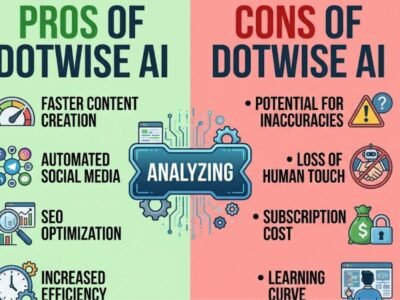
A major potential advantage is having project materials and AI assistance in a more connected environment. This could reduce the friction of switching between applications and make long-running projects easier to manage. The approach may also appeal to people who use AI for more than occasional questions and need to keep research, drafts, and decisions organized over time.
Another benefit is the focus on collaboration. Rather than treating AI output as the final answer, the proposed workflow leaves room for users to review and improve the work.
Limitations to Consider
The biggest limitation is availability. The official website currently asks interested users to join the waitlist, which means prospective customers should not assume they can immediately access a complete product.
Pricing, detailed plan comparisons, and the performance of specific features should also be verified directly rather than guessed. Users should consider privacy, file access, editing controls, and compatibility with their existing tools before moving important work into a new environment. Until these aspects can be evaluated firsthand, the long-term benefits remain promising possibilities rather than proven results.
Dotwise AI Alternatives
If you need an AI productivity solution today, several established tools are worth exploring.
ChatGPT can help with writing, research assistance, brainstorming, file-based tasks, and project discussions. It may be suitable for people who primarily need a versatile AI assistant.
Notion combines notes, documents, databases, and project organization. It can be useful for teams that want to manage tasks and knowledge in one structured workspace.
Obsidian is designed around linked notes and a local-file-based knowledge system. It may appeal to users who want control over their personal knowledge base and are comfortable customizing their workflow.
Claude can assist with writing, analysis, and working with documents. It may be a good option for users who prioritize extended writing and document-focused tasks.
These alternatives serve different purposes, so the best choice depends on whether you need an AI assistant, a knowledge-management tool, or a connected environment for ongoing projects.
Is Dotwise AI Worth Trying?
This Dotwise AI Review suggests that the platform has an interesting direction for people who want AI to become a more integrated part of their daily work. Its emphasis on connected project materials and AI-agent collaboration addresses a genuine challenge: keeping information organized as tasks grow more complex.
However, whether Dotwise is worth using will depend on its actual availability, usability, privacy protections, and performance once users can access it. If you are interested in its approach, joining the official waitlist is a reasonable first step. If you need a reliable solution immediately, compare established alternatives before changing your current workflow.
Conclusion
Dotwise is being developed around the idea that AI should work within the context of a project rather than exist only in a separate chat window. That concept could be valuable for writers, researchers, developers, and business owners who manage ongoing work across different types of files and applications.
Nevertheless, it is too early to make a definitive judgment about its performance as a fully available product. Check the official website for release updates, evaluate its real features when access becomes available, and compare it with existing tools before making a decision.
Frequently Asked Questions
1. What is Dotwise AI used for?
Dotwise is being developed as a workspace that brings notes, files, chats, code, browser activity, and AI-agent workflows together to support ongoing projects.
2. Is Dotwise AI available to everyone?
Its official website currently promotes a waitlist. Check dotwise.ai for the latest availability information.
3. Is Dotwise AI free?
Publicly confirmed pricing was not available on the official page reviewed for this article. Check the official website for current pricing announcements.
4. Who may benefit from Dotwise AI?
Its proposed approach may interest writers, researchers, developers, marketers, and entrepreneurs who work on projects involving multiple files and ongoing research.
5. What are the alternatives to Dotwise AI?
ChatGPT, Claude, Notion, and Obsidian are potential alternatives, depending on whether your priority is AI assistance, project organization, or knowledge management.

COMMENTS