
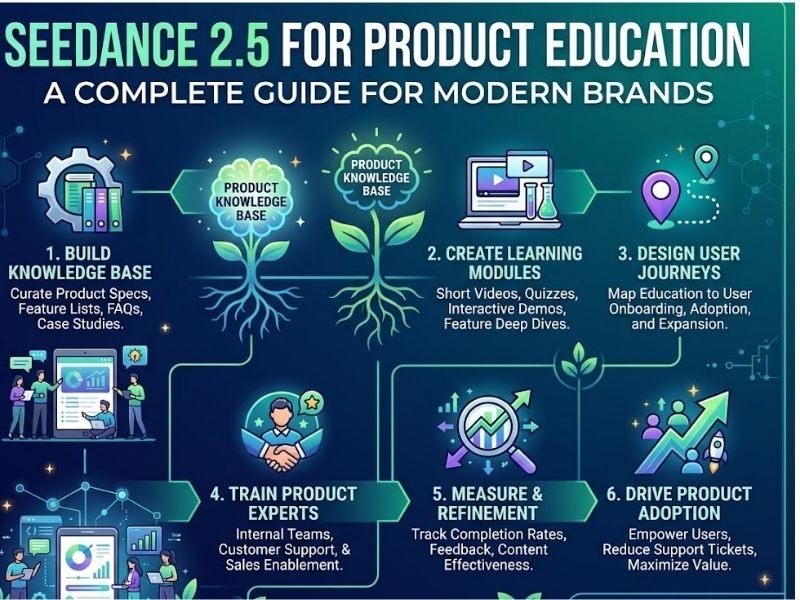
Introduction Seedance 2.5 for Product Education is opening new possibilities for brands that want to explain products through engaging video content.
Introduction
Seedance 2.5 for Product Education is opening new possibilities for brands that want to explain products through engaging video content. Traditional product education often depends on written manuals, static images, presentations, or professionally filmed demonstrations, which can take considerable time and resources to produce. AI video generation is changing that process by allowing businesses to turn scripts, product images, reference videos, and creative ideas into more dynamic visual content. ByteDance’s Seedance 2.5 is designed for audio-video generation, with single-generation videos of up to 30 seconds, multimodal references, and more precise editing capabilities. For brands, this creates an opportunity to develop AI product videos that make product features easier to understand while reducing some of the effort involved in traditional video production.
What Is Seedance 2.5 for Product Education?
Seedance 2.5 for Product Education refers to using the AI video model to create instructional, explanatory, and demonstration-based content around products and services. Instead of simply showing a product on a page, brands can create short visual sequences that explain how something works, how it should be used, or why a particular feature matters.
Seedance 2.5 can generate videos using text and multiple types of reference material. According to ByteDance, the model can work with up to 30 images, 10 video clips, and 10 audio clips as references in a single generation. It also supports timestamp-level editing and reference-based editing.
This can be useful for companies that need different versions of educational content for websites, social media, training materials, presentations, or customer-support resources.
How AI Product Videos Can Explain Products Better
AI product videos can turn complicated information into something easier to understand visually.
For example, a technology company could explain how a new device works by showing different components and their functions. A software company could create a short visual explanation of a new feature. A manufacturer could demonstrate how a machine operates without organizing a complete physical filming session.
The key advantage is flexibility. A brand can start with a written explanation and turn important sections into visual scenes. Instead of asking customers to read several paragraphs about a product feature, companies can potentially demonstrate the same idea through a short video.
This does not mean written documentation is becoming unnecessary. Product pages, manuals, and detailed guides are still valuable. Video simply provides another way to communicate information.
Creating Product Education Content With AI
Good product education content should answer practical questions that customers actually have.
Before creating a video, brands should identify the most important information the viewer needs. This could include how to set up a product, how a feature works, how to solve a common problem, or how to get better results from the product.
Seedance 2.5 can help turn these ideas into structured visual scenes. Its ability to use reference materials can also help brands provide visual guidance for products, characters, scenes, and creative direction.
For example, a brand could provide product images as references and create a short demonstration showing the product being used in a realistic environment. This can make the educational material more engaging than a collection of static screenshots.
Seedance 2.5 for Product Education and Product Demonstrations

Seedance 2.5 for Product Education
One of the strongest applications of Seedance 2.5 for Product Education is product demonstration.
A demonstration can show customers what they need to do rather than simply telling them.
Consider a home appliance company introducing a new smart device. Instead of writing a long explanation about installation, the company could create a short sequence showing the device being unpacked, connected, configured, and used.
Similarly, an electronics company could create a visual explanation of different settings or modes.
Because Seedance 2.5 supports longer single-generation videos of up to 30 seconds and multiple rounds of extension, brands can create more complete sequences instead of relying only on very short clips.
Using AI Video Generation for Customer Training
AI video generation can also support customer training.
Some products require users to understand several steps before they can use them effectively. Training videos can simplify this process by presenting instructions visually.
Businesses could create separate videos for different stages of the customer journey. One video might explain setup, another could cover basic operation, and another could provide troubleshooting information.
This modular approach can make product education easier to update.
If a feature changes, the business may only need to revise the relevant section rather than recreate an entire training library from scratch.
Making Complex Products Easier to Understand
Seedance 2.5 for Product Education can be particularly useful when a product is difficult to explain through text alone.
Technical products often contain features that are invisible or difficult to demonstrate. Visual storytelling can help simplify these concepts.
For example, a cybersecurity company could visually explain how a security system detects suspicious activity. An industrial company could show how equipment moves through different operating stages. A software company could illustrate what happens when users activate a particular feature.
The goal should not be to make the video complicated. The best educational videos usually focus on one idea at a time.
Reference-Based Content for Brand Consistency
Brand consistency is important when creating large amounts of educational content.
Seedance 2.5’s reference capabilities can help creators provide visual material that guides the generated output. ByteDance says the model has been upgraded to better understand subjects, scenes, styles, props, and other elements across multiple references.
For brands, this could be useful when creating a series of product videos with similar visual identities.
Companies can establish a consistent style for backgrounds, product presentation, characters, camera movement, and overall tone.
However, generated content should still be reviewed before publication to make sure product details are accurate.
Why Human Review Still Matters
Even with advanced AI video tools, human review remains essential for product education content.
An AI-generated video can look convincing while still presenting an incorrect product feature, unrealistic operation, or misleading visual detail.
Brands should therefore compare generated videos with official product specifications before publishing them.
For technical, medical, financial, or safety-related products, accuracy is particularly important.
AI should be treated as a production and creative tool rather than a replacement for product experts.
A strong workflow combines AI generation with human knowledge, editing, fact-checking, and quality control.
Building a Better Product Education Workflow
A practical workflow for Seedance 2.5 for Product Education can begin with a simple product brief.
First, identify the audience and the learning objective. Next, write a short script that explains one specific product concept. Then collect relevant product images, diagrams, videos, or other reference materials.
After generating the first video, review the result carefully. Check the product appearance, movement, narration, timing, and overall accuracy.
Seedance 2.5 supports editing and targeted changes, which can help creators refine specific parts of a generated video rather than starting completely from scratch.
This iterative approach can make AI video production more practical for businesses.
Future Opportunities for Brands
The use of Seedance 2.5 for Product Education could expand as businesses become more comfortable with AI-generated video.
Brands may create personalized educational videos for different customer groups, languages, markets, or product versions.
E-commerce companies could use short educational videos directly on product pages. Software companies could create feature explainers automatically. Manufacturers could develop training libraries for equipment and processes.
The broader opportunity is not simply producing more videos. It is producing useful videos faster and adapting them more easily when products or customer needs change.
Conclusion
Seedance 2.5 for Product Education offers brands a new way to approach demonstrations, tutorials, training, and customer education. Its support for longer single-generation videos, multimodal references, native audio-video generation, and more precise editing makes it suitable for a variety of creative and instructional workflows. AI product videos can make complicated information more visual, while AI video generation can help businesses produce and update educational material more efficiently. However, the most effective approach combines AI with human creativity, product expertise, and careful fact-checking. As these tools continue to improve, businesses may increasingly use them to make product education content clearer, faster to produce, and more engaging for customers.
FAQs
What is Seedance 2.5 for Product Education?
Seedance 2.5 for Product Education means using Seedance 2.5’s video-generation and editing capabilities to create product demonstrations, tutorials, training videos, and explanatory content.
Can Seedance 2.5 create AI product videos?
Yes. Seedance 2.5 is designed for audio-video generation and can create videos from prompts and reference materials. ByteDance says it supports videos up to 30 seconds in a single generation.
How can AI video generation help businesses?
AI video generation can help businesses create demonstrations, explainers, training materials, promotional content, and educational videos with less reliance on traditional filming workflows.
Is human editing still necessary?
Yes. Businesses should review AI-generated content for product accuracy, brand consistency, visual quality, and potentially misleading information before publishing it.
What types of product education content can brands create?
Brands can create setup tutorials, feature explanations, product demonstrations, troubleshooting videos, training materials, and short educational clips for websites and social platforms.
Can Seedance 2.5 use product images as references?
Yes. ByteDance states that Seedance 2.5 supports multimodal reference inputs, including images, video clips, and audio clips.

COMMENTS